
Can I Turn a Brain Dump Into a Real Project Just by Talking to My Planner?
Yes. Connect Claude or ChatGPT to Snug Planner, paste your brain dump in plain words, and it builds the project for you: tasks with due dates, a reminder, and a page that keeps your original idea.
Snug is a personal planner first, so that project is private unless you decide to share it.
Why do side projects keep dying?
A while ago I had an idea for a small app that reminds you when to water your plants. The notes went into Google Notes. A few links sat in a chat with myself. The to-dos lived in my head.
A month later I found the note again. I could not remember why I had been so excited about it.
If you have a graveyard of side projects, you probably know that feeling. Your side projects don't fail because you're lazy.
Let's be honest, they fail mainly because of a bunch of neurological reasons, but to make them less likely to fail, it helps to have good software. To go from having them live in five different apps to just one.
What does "talking to your planner" mean?
Here is Snug Planner in one breath. A cozy all-in-one planner. Calendar, tasks, projects, notes, lists and files live in one app. Snug is a personal planner first, and you can share it with your household whenever you want.
You connect your own AI to Snug through the Snug MCP server. After that, you tell the AI what you want in plain words. It does the clicking, typing and organizing in Snug for you.
Setting it up takes about three minutes:
- In Snug, open Settings → AI Integration and click Generate API key.
- Click Copy prompt. The prompt already contains your key.
- Paste the prompt into Claude Code, Claude Desktop or ChatGPT, and follow what it tells you.
The setup guide for Claude has every step, with a fix for each common snag.
What happens when I paste in a brain dump?
Here is the plant app, exactly as messy as it was in my notes:
Turn this into a project in Snug test: side app that reminds me when to water my plants. Each plant gets a schedule, the app nudges me on the day. Need a landing page, pick a name, set up the repo, first beta by end of October. Maybe photos per plant later.
One message later, Snug holds:
A private project called "Plant watering app".
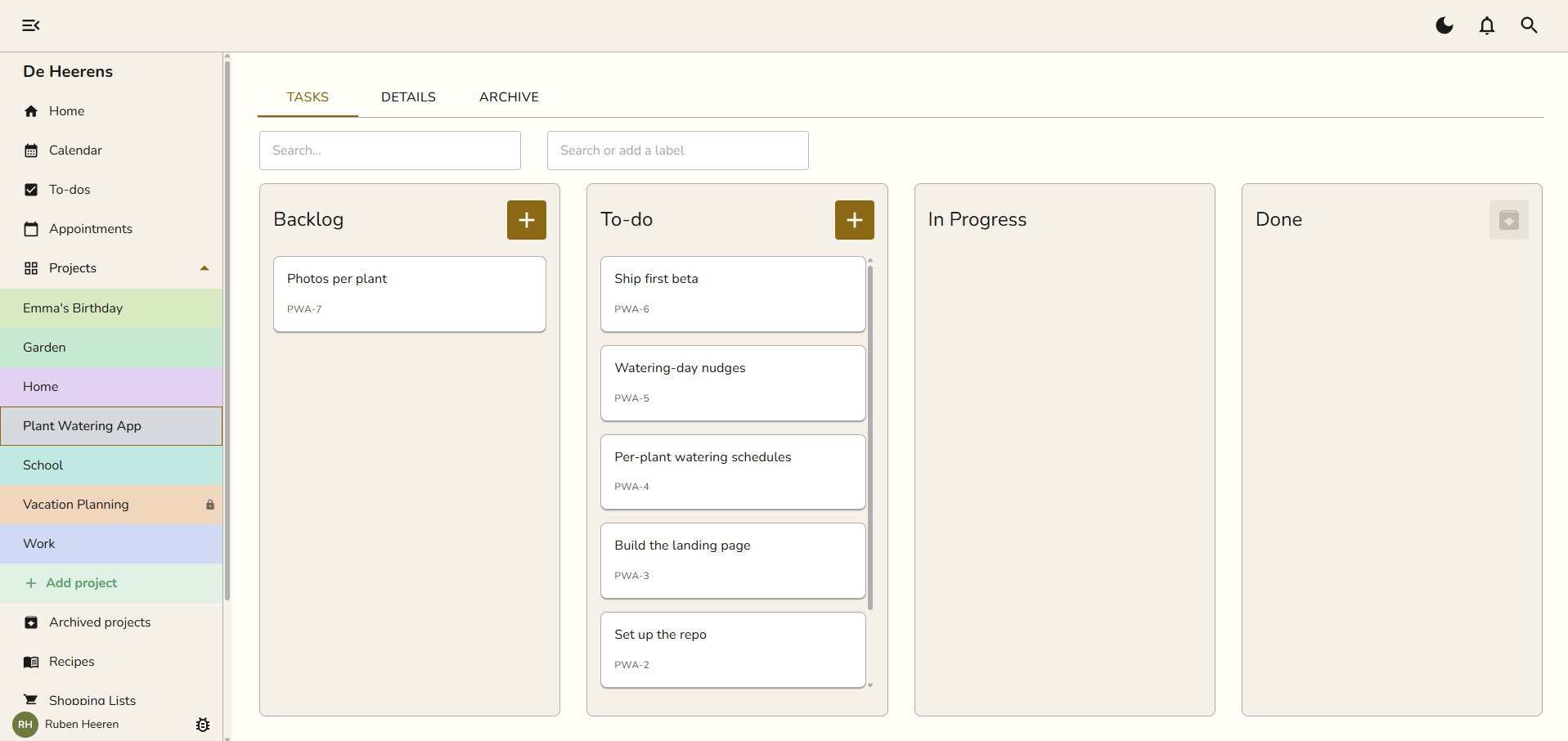
Six tasks with due dates, from "Pick a name" at the end of September to "Ship the first beta" on 31 October. The first two sit in Todo. The rest wait in Backlog until you get there.
A reminder one day before the beta is due.
A page with the original idea, so the thinking behind the project stays next to it.
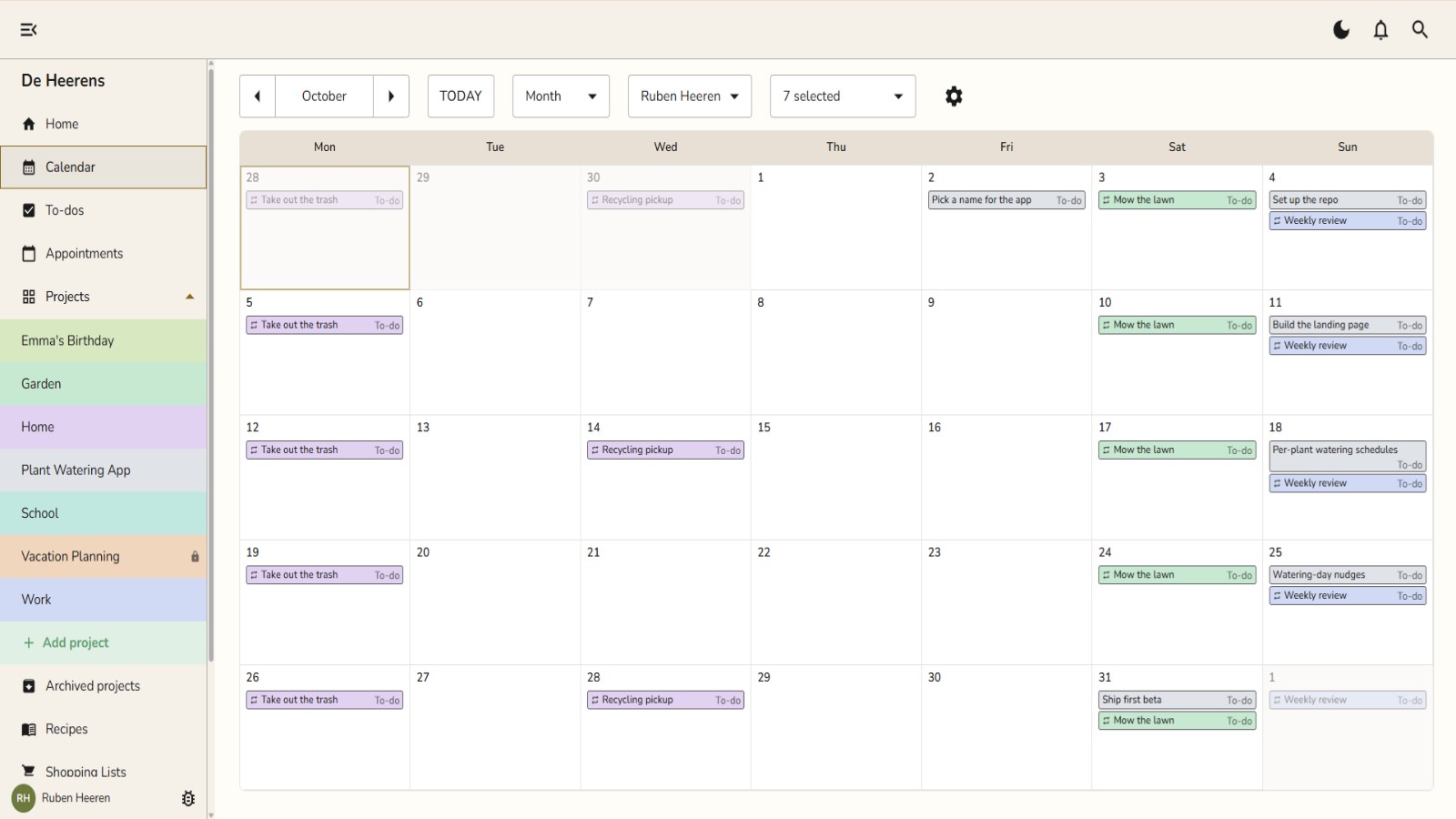
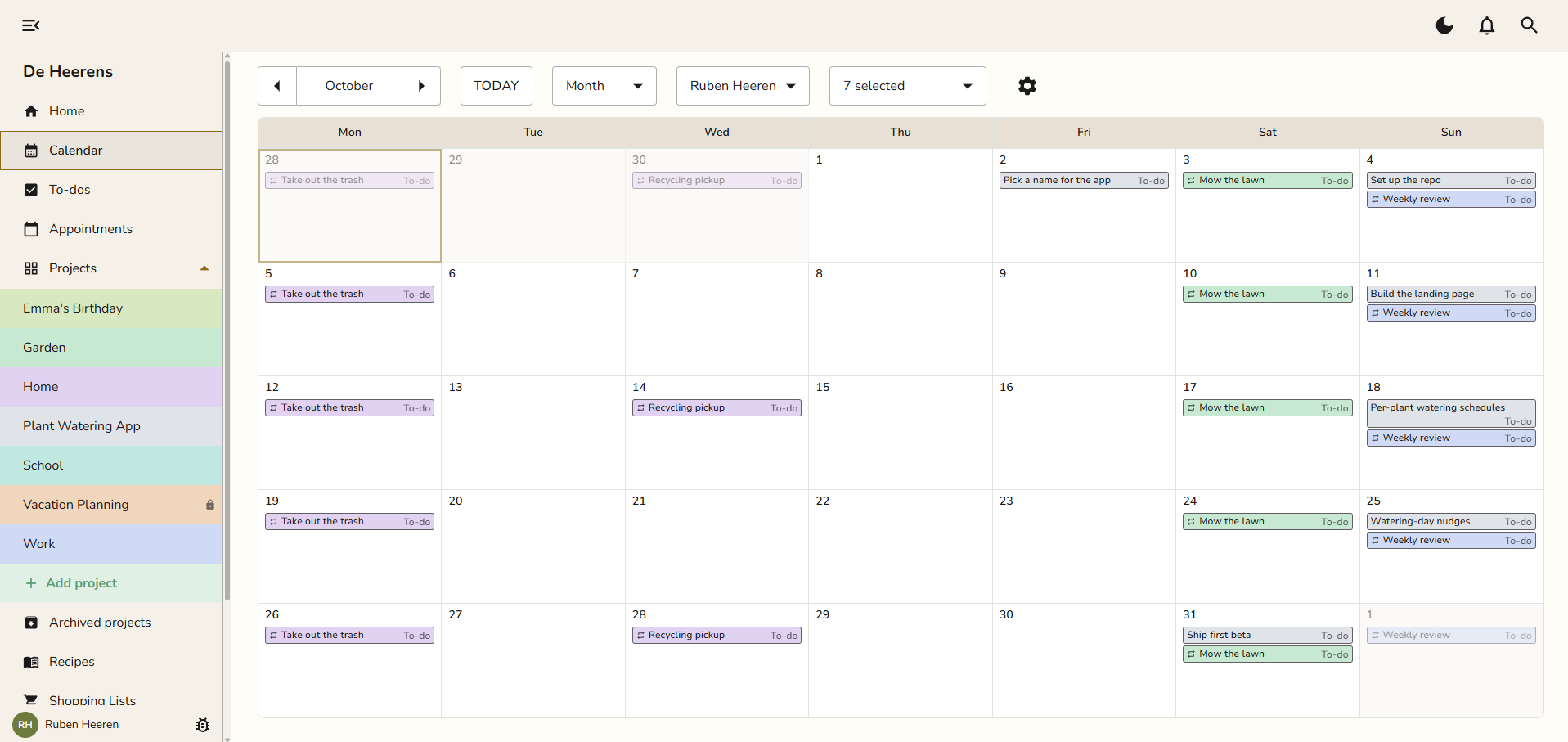
The tasks also land on your calendar. That is the part that keeps a side project alive. It finally has dates you see every morning, next to everything else in your week.
Nothing is locked in. Change a date, rename a task or drag it to Doing, the same as anything you made by hand.
Isn't Snug a family app? I don't have a family.
You do not need one. Snug is a personal planner first.
Everything you make is private by default. An appointment or a to-do shows only to the person who made it and the people added to it. A private project shows only to the members added to it. If you never add anyone, Snug is simply your own planner.
Sharing is there for later, when you want it. A partner, a housemate, a co-founder on one of those side projects.
Will the AI make a mess of my planner?
The AI only does what you ask. Everything it creates shows up in Snug right away, so you see it and can change or delete it.
You also stay in control of the connection. Your key sits under Settings → AI Integration. Delete the key, and the AI loses access immediately.
Do I have to set it all up first?
No. Snug has fixed building blocks: projects, tasks, the calendar, pages, lists and files. There is nothing to design, so you cannot lose a weekend building a dashboard instead of building the project.
Notion is the fair comparison here. Notion can model almost anything, with databases, templates and its own calendar app. If you enjoy building your own setup, that freedom is a real gift. The catch is that everything becomes a page inside a page inside a page. A project slips into a collapsed tree, and you stop opening it.
How does Snug Planner compare to other tools?
| Tool | Price | What it does well | Where it falls short for side projects |
|---|---|---|---|
| Snug Planner | 3 months free, then $4.99 a month (Plus) or $12.99 a month (Max) | Calendar, tasks, projects, pages and files in one app. Your AI builds the plan for you. | No free version after the first 3 months. No custom fields. |
| Notion | Free plan. Plus is €9.50 per member a month, paid yearly | Builds almost anything, with databases, templates and its own calendar app. | Everything is a page inside a page, and projects get lost in the tree. |
| Todoist | Free plan | Fast capture and good lists. | A task has no home. Its files and notes live somewhere else. |
| Google Calendar | Free | You already have it, and so does everyone you know. | Fine for events, weak at anything that is not an event. Snug syncs with it. |
If one of these already keeps your side projects moving, keep it. Snug is for the moment you notice your ideas live in five apps and none of them talk.
Who is Snug for, and who is it not for?
Snug is for you if you juggle a job and a few side projects, and you want them in one place without building that place first.
Snug is not for you if you love building your own setup in Notion and it works. It is also the wrong fit if you need custom fields for everything, because the building blocks are fixed on purpose.
Will Snug still be here in two years?
A fair question for any small app. Snug had 19 published releases between March and September 2026, and every one of them is in a public changelog.
I use Snug Planner daily and now have a few paying users on it, so I can't think of a reason to stop working on this any time soon.
Start with one idea
Pick the side project that is still alive, just about. Paste it in tonight and see it land on your calendar.
Already have an account? The setup guide gets your AI connected in about three minutes.
Want to see more of what your AI can do in Snug, from moving an appointment to saving a recipe? Read Claude and Snug Planner.