

Shared Calendar for Co-Parents: How Two Households Stay in Sync
A shared calendar for co-parents works when both homes look at the same week, and when each parent still keeps a private life. In Snug Planner you put the children's week in one place, invite the other parent by email, and they see only what you add them to.
Picture a Sunday evening
Three kids, three bags, and a week of details that has to move from one home to the other. Who has the dentist on Tuesday. Whose football kit is at the wrong house. Which slip needs a signature before Wednesday.
Most of it lives in your head. The rest sits in a chat thread from three weeks ago. This is a made-up Sunday, but if you co-parent, you probably know one like it.
You do not need to be more organized. You need everyone else to know what you already know.
What does a shared calendar for two homes need?
Three things, and most setups miss at least one.
One place both parents open. A shared calendar plus a chat plus a notes app is three places, and things slip between them.
An easy way in for the other parent. If it takes them more than two minutes, they will not do it.
Privacy for your own life. Sharing the children's week should never mean sharing your own.
How do you set it up in Snug Planner?
Here is what Snug Planner is, in one breath. A cozy all-in-one planner. Calendar, tasks, projects, notes, lists and files live in one app. Snug is a personal planner first, and you can share it with your household whenever you want.
For two homes, the setup takes one evening.
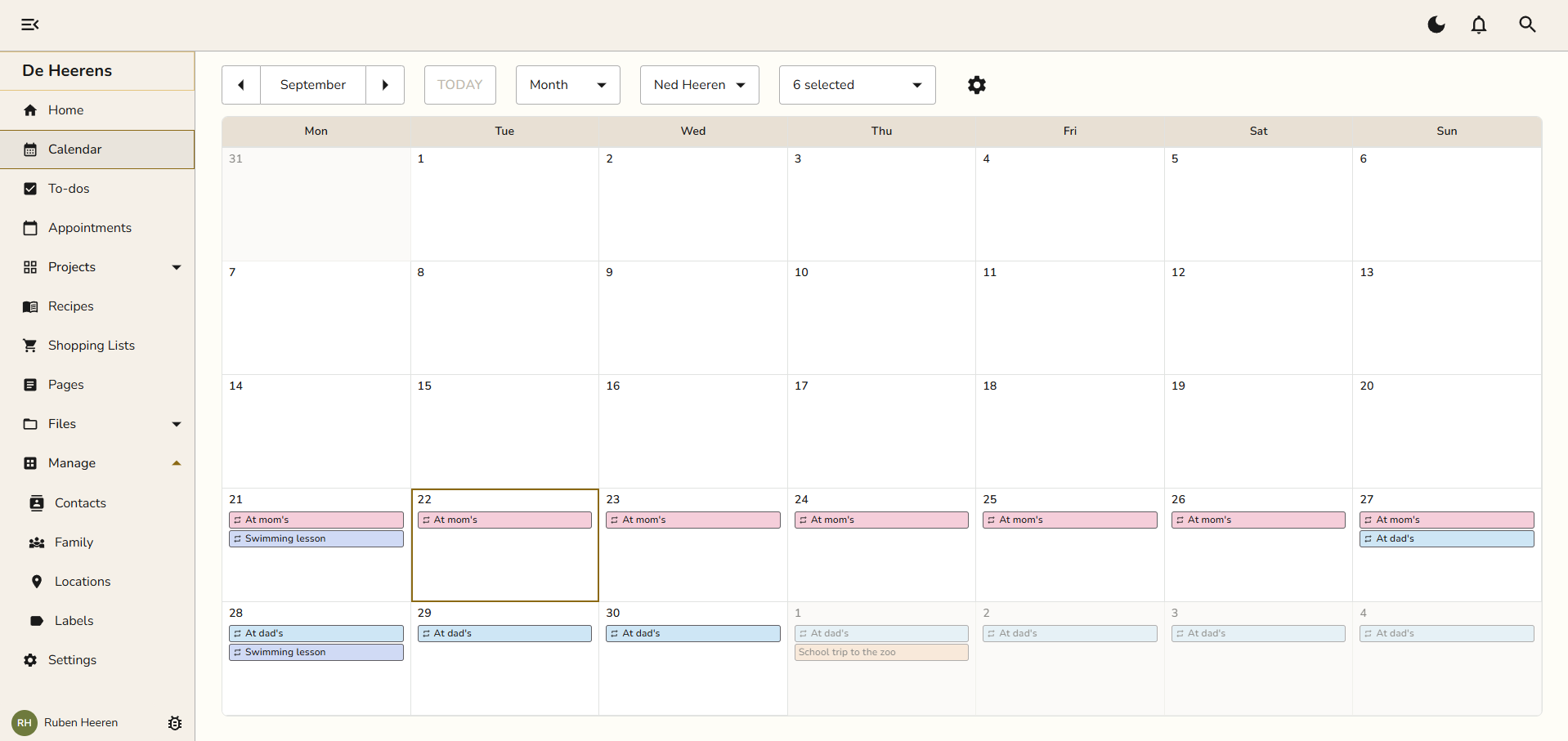
1. Put the children's week in. Add the appointments you already know: school, sports, the dentist. Give each one a color if you like. Whether you do week-on-week or every other weekend, the custody schedule goes in once and repeats by itself.
2. Mark who is where. Add "At mom's" as one long appointment across the week, and "At dad's" across the next. Now anyone who opens the calendar sees at a glance where the children sleep on Thursday.
3. Invite the other parent. Open Settings, go to the family members, and add a family member. Choose "Send an invite" and type their email address. They get an email, follow it, and set up their own account. There is nothing for them to configure.
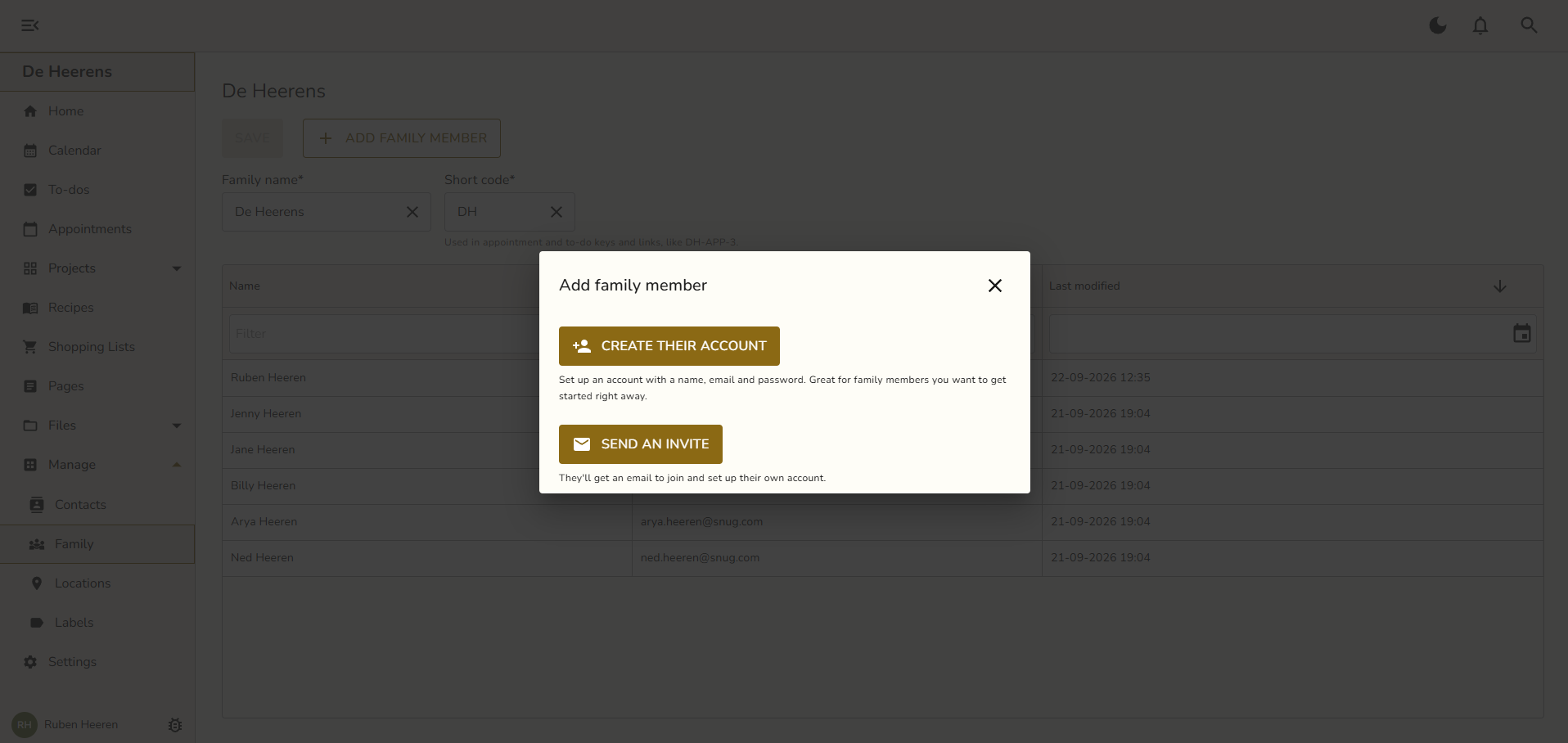
4. Got a teenager with a phone? Choose "Create their account" and set it up for them with a name, an email and a password. A 13 year old will not join because you asked. They will open it to see what time football is.
Want to try it with this week? Start your 3 months free. No credit card.
Can the other parent see my private appointments?
No. They see what you add them to. Nothing else.
In Snug, an appointment or a to-do shows only to the person who made it and the people added to it. So your own life stays yours by default. A private project works the same way: only the members you add can see it.
That gives you one simple habit: add both parents to anything about the children. A dentist visit with both of you on it shows in both calendars. Your own appointment, with only you on it, shows in yours alone.
What if the other parent never opens it?
They do not have to set anything up. They pick a password, and the calendar is already full, because you filled it. They can look without ever adding a thing.
They also get a reminder for the children's appointments as a push notification or an email, without opening the app. So even a parent who does nothing still knows about Tuesday's dentist.
And if they never join at all, you have still moved everything out of your head and into one place. That alone is worth the evening.
A calendar you both trust also means fewer tense messages. Less "I told you about this", more "it's in the calendar". For many co-parents, that is the real win: less conflict, and children who notice the difference.
How does it compare with what you use today?
| Option | What it does well | Where it falls short for two homes |
|---|---|---|
| A shared Google Calendar plus a chat | Free, and you both already have it. | Only events. Lists, contacts and school info stay scattered, and details get buried in the chat. |
| Cozi | A shared family calendar and lists, with a free version. | Built for one household. The free version shows ads. |
| OurFamilyWizard | Made for separations that need a record: recorded messages, expense tracking, and a tone check on what you write. Courts order parents to use it. | Priced per parent, roughly $150 to $300 a year each. More than most families with a working arrangement need. |
| Snug Planner | One place for the calendar, lists, contacts and files. Private by default. One price covers the whole family. | No free version after the first 3 months. |
If a shared Google Calendar already works for you both, keep it. It is free, and Snug syncs with it if you later want the rest. And if your separation needs a formal record, OurFamilyWizard is built for exactly that.
Snug is for the families in between: you get along well enough, and you need the logistics to work.
What does it cost?
Every new family gets 3 months free with every feature, and no credit card.
Three months covers a dozen handovers, which is enough to find out if it works for your family.
Billing is per family in Snug, so one subscription covers both you, your ex and the children.
After that, Snug Plus is $4.99 a month or $44.99 a year.
There are no ads and no tracking, ever. Your data is hosted in the EU, and if you cancel, everything you entered stays readable.
Snug works in any browser, with apps for iPhone and Android, and every change shows up on every device right away.
Start with this week
Set up the children's week tonight. When it looks right, invite everyone 😊.
Curious why Snug feels more like a home than an office tool? Read Why I built Snug.
Photo by Juliane Liebermann on Unsplash